For Sports, News & Editorial Photography
macOS, iPadOS & iOS
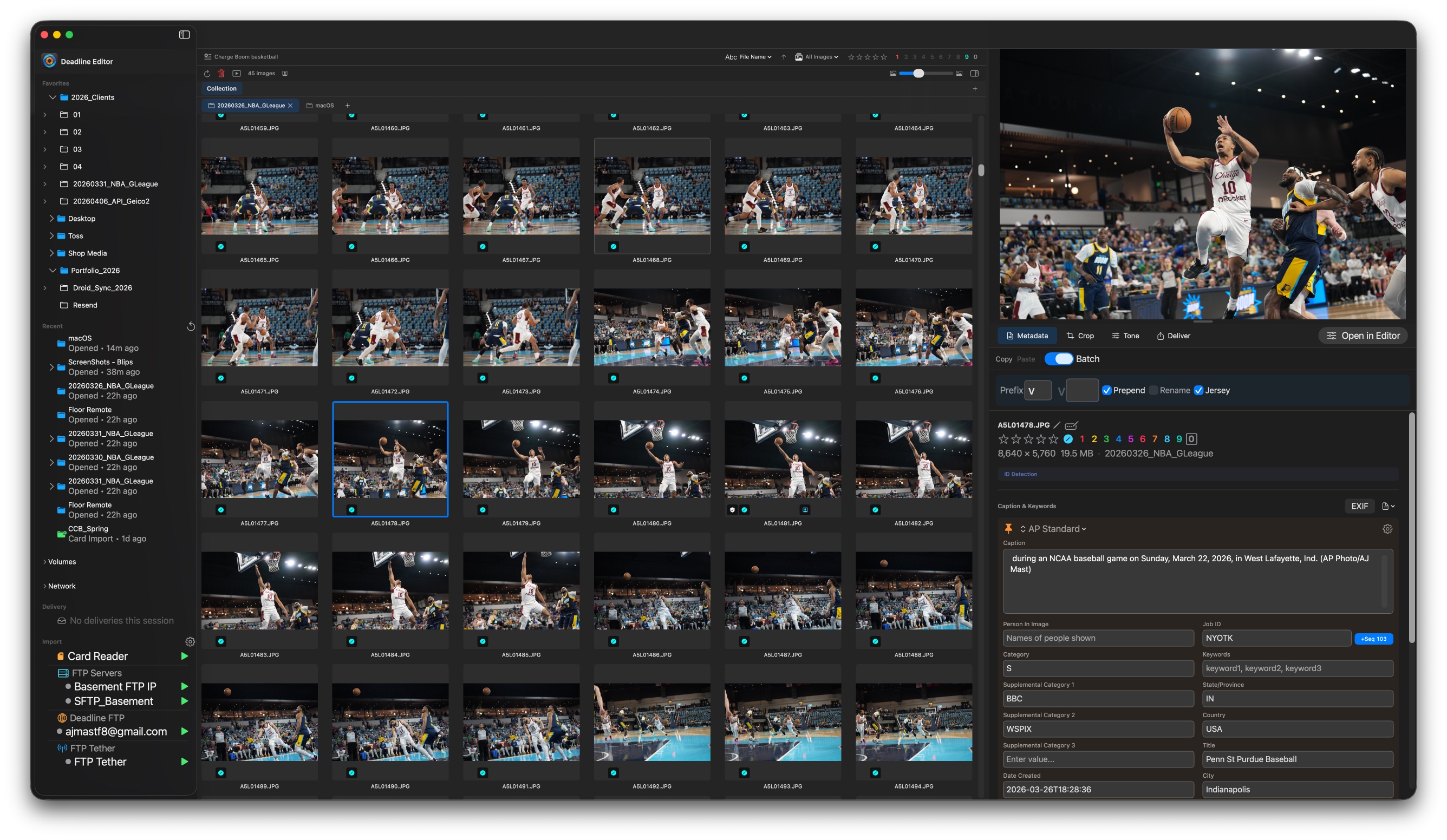
Import. Cull. Caption.
Crop. Tone. Deliver.
All in one app.
Deadline Editor is a complete photo editing and asset management tool for photographers who work under tight deadlines. Import from any source, edit with built-in toning and cropping, caption with Quick Text and audio transcription, and deliver via FTP — without leaving the app.
Import from cards, FTP tether, folders, or DeadlineFTP cloud
Built-in toning, curves, crop — with editorial-only mode
Quick Text captioning with sports roster generator
Full XMP/IPTC metadata with templates and 50+ variables
All settings sync between Mac and iPad/iOS via iCloud
Subscribe on the Mac and the free iPhone and iPad app is included — with a 7-day trial and a free client-viewer mode for everyone else. See the pricing page.
macOS
Desktop app
iPadOS & iOS
Mobile app
Synced
Settings via iCloud
Your editing workflow, simplified
From import to delivery in a single app.
Import
Card, FTP, or cloud sync
Caption
Quick Text, voice, batch ID
Edit
Tone, crop, metadata
Deliver
FTP, SFTP, PhotoShelter
Import
Import from any source
Camera cards, hot folders, built-in FTP tether, remote FTP servers, and Deadline FTP cloud — all in one browser.
Flexible Import
Camera card import, hot folder monitoring, built-in FTP tether for Wi-Fi camera connection, remote FTP server import, and Deadline FTP cloud sync.
Unified Source Browser
Favorites, recent folders, local volumes, network/SMB shares, FTP servers, hot folders, and Deadline FTP sources in one sidebar.
Transfer From
Move pictures from your laptop to your desktop or NAS — pull images from another Mac over the local network, no internet or cloud required.
Metadata
Caption and tag at the speed of thought
Full XMP/IPTC editing, templated metadata, Quick Text, batch mode, audio transcription, and photographer detection.
66+ XMP/IPTC Fields
Nine categories of metadata fields: Basic, Description, Creator, Content, People, Location, Rights, Workflow, and Camera Info. Pinned fields for your most-used entries.
XMP Templates & Variables
Create templates with 50+ built-in variables for file info, dates, camera data, and photographer detection. Immediate, deferred, and Photo Mechanic syntax supported.
Quick Text Autocomplete
Type a short code and expand to a full description. Delimiter mode and phrase autocomplete from CSV/TSV source files. Built-in sports roster generator for NFL, NBA, MLB, NHL, and college sports.
Batch ID Tagging
Keyboard-driven batch ID mode (Cmd+B) for rapid player or event tagging. Live Quick Text matching with disambiguation, copy/paste across consecutive images.
Audio Memo Transcription
Camera audio memo transcription converts voice tags to captions automatically. Smart transcription translates spoken jersey numbers and team names into full player descriptions via Quick Text.
Photographer Registry
Ensures the right photographer's metadata gets on their images when working with groups of photographers. Auto-detects photographers from camera serial numbers, folder names, or XMP fields.
* Roster creation requires an internet connection.
Cropping
Precise, repeatable crops
Photoshop-style cropping with aspect presets, custom dimensions, rotation, and saveable crop templates.
Crop & Rotation
Photoshop-style cropping with aspect ratio presets (16:9, 4:3, 3:2, 1:1, 5:7), custom dimensions, and arbitrary rotation with a rule-of-thirds overlay.
Saved Crop Presets
Save reusable aspect-ratio and crop templates and apply them across images for consistent output.
Toning
Professional tone and color controls
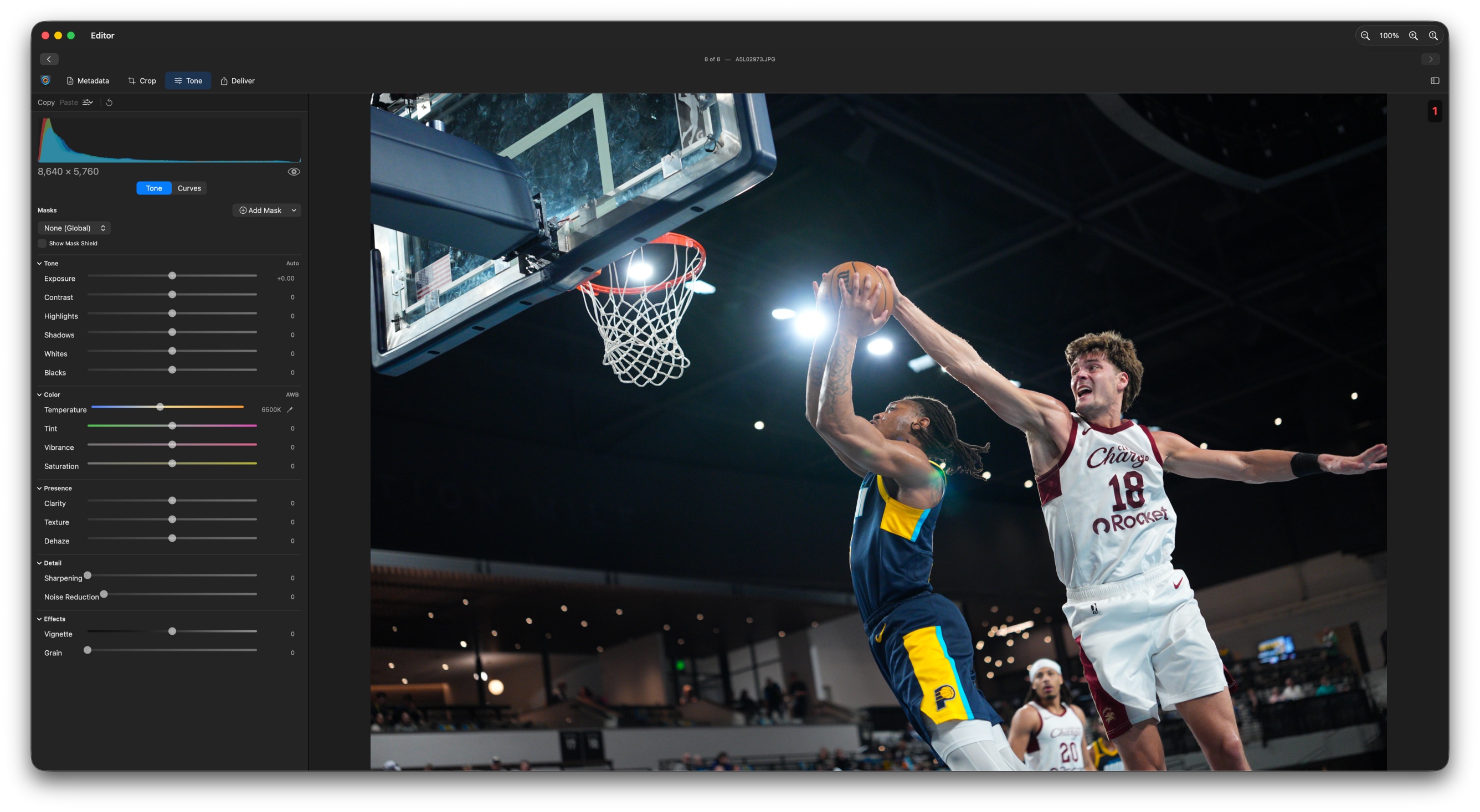
Non-destructive, GPU-accelerated adjustments with curves, masking, editorial-only mode, and presets.
Tone & Color Controls
Exposure, Contrast, Highlights, Shadows, Whites, Blacks, Temperature, Tint, Vibrance, Saturation, Clarity, Texture, Dehaze, and Noise Reduction — with white-balance sampling and a live histogram.
Curves Editor
Bezier curve editor with histogram overlay for precise tonal adjustments. Live histogram updates as you adjust. Before/after toggle with spacebar.
Subject & Background Masking
Localized adjustments with auto-detected subject and background masks, plus manual tone masks to dodge and burn (macOS).
Editorial-Only Toning
Journalism mode restricts adjustments to editorial-safe toning controls only, disabling masking and cloning to enforce integrity standards required by news organizations and wire services.
Presets & Batch Editing
Save, load, rename, and manage tone presets with iCloud sync. Copy/paste adjustments across images. Apply presets to entire selections at once.
Delivery
Validated export, delivered everywhere
Multi-format export with validation, progressive delivery, and FTP/SFTP/PhotoShelter upload.
Multi-Format Export
JPEG, PNG, TIFF, HEIC with quality controls, resize options, metadata control, file size limiting, and pattern-based renaming with variable support.
FTP / SFTP Upload
Upload to configured FTP servers with retry on failure. Configure multiple destinations for wire services, clients, or newsrooms. PhotoShelter integration included.
Export Validation
Per-field validation rules on XMP templates with three severity levels. Required fields block delivery, alerts need acknowledgment, warnings are dismissible.
Progressive Delivery
Images that pass validation deliver immediately. Images with issues are held in a pending queue. Fix metadata and re-validate without restarting the export.
Other
Everything else that keeps you fast
A high-performance gallery, flexible panels, and settings that sync across your devices and team.
High-Performance Gallery
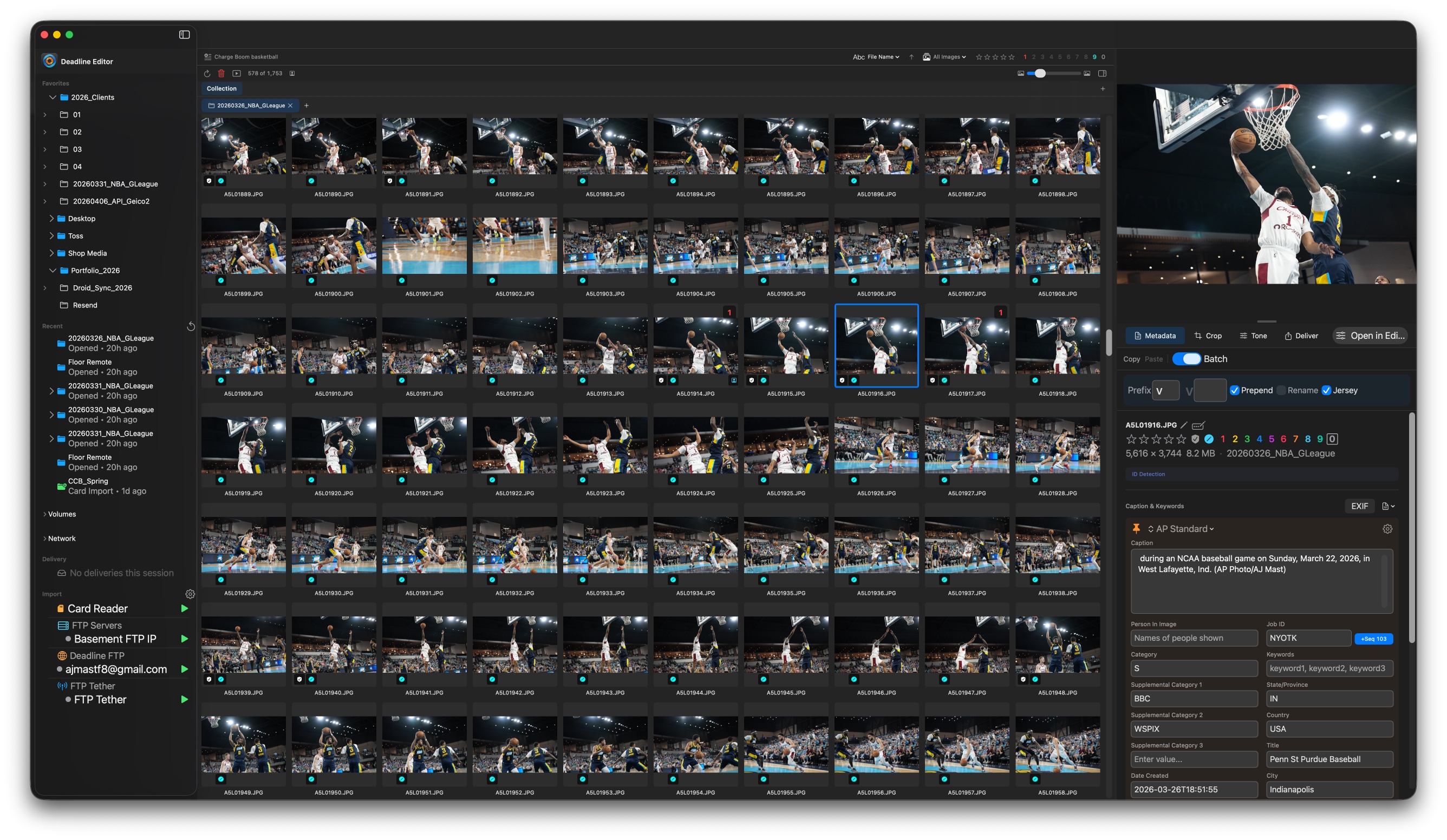
Virtual scrolling handles large collections smoothly. Adjustable thumbnail grid with configurable sizing and filename display.
Smart Filtering
Filter by color code, star rating, file type, protected status, transcription state, export status, batch ID, and more.
Tabs & Collections
Work on different shoots simultaneously with independent sort, filter, and selection state per tab. Custom sort orders including drag-and-drop.
Ratings & Color Codes
Color coding (0–9) and star ratings (0–5) applied instantly via keyboard shortcuts, with multi-select and hover-priority support.
Full-Screen Slideshow
Auto-advance slideshow with zoom/pan. Rate and color-code images without leaving the presentation view.
Flexible Interface
Work from the info panel or the dedicated editor panel — caption, crop, tone, and deliver in whichever interface you prefer. Dual-monitor support on macOS.
Settings Sync
All settings sync across macOS, iPadOS & iOS via iCloud. With a DeadlineFTP account, push templates, pinned fields, Quick Text, and presets to your whole team.
Available on macOS, iPadOS & iOS
Edit at your desk or in the field. Your data stays on your device — no cloud, no telemetry.
100+
Keyboard shortcuts
66+
XMP/IPTC fields
50+
Template variables
Rust
High-performance core
Screenshots
See it in action
The same powerful workflow on your Mac, iPad, and iPhone.
Part of the Deadline family
Works great with DeadlineFTP
Use Deadline Editor on its own, or pair it with DeadlineFTP for a complete camera-to-delivery workflow. Sync photos, settings, templates, and Quick Text across your team.
Learn about DeadlineFTP